Key Points:
- BISE Faisalabad has issued a nine-point guide for filling the e-sheet in the Intermediate Part Two Computer Science paper
- Only a blue or black ink ballpoint is allowed; markers, byliners, gel pens and pencils are barred
- A half-filled, ticked or crossed bubble is marked wrong
- Anything written outside the margin will not be scanned
BISE Faisalabad has told Intermediate Part Two Computer Science candidates to fill their e-sheets exactly as instructed.
According to the board’s instructions, the directions cover the Computer Science paper, whose marking is done on screen from the scanned answer sheet.
The Controller of Examinations, BISE Faisalabad, has put the warning at the top of the poster. Whatever does not appear in the scan will earn no marks.
The board’s instructions allow only a blue or black ink ballpoint on the sheet. Markers, byliners, gel pens and pencils are barred outright.
Candidates must copy the roll number from the slip and fill one bubble only in each column. The paper code must be written with its bubbles filled; the date, part, session, subject, name, father’s name and signature must be entered with their bubbles.
The board says a bubble counts only when it is filled completely and deeply. Two bubbles in one line, a half-filled bubble, a tick or a cross are all wrong; the ink must stay inside the circle.
“Whatever does not appear in the scan will earn no marks.”
Each answer must stay within the pages and lines allotted to its question, without space wasted on copied questions or large headings. Anything written outside the outer margin will not be scanned; nothing may be written on or near the QR code or barcode.
The instructions require neat writing without pressure on the pen, because faint or distorted writing can disappear in the scan. Rough work belongs only on its reserved page and no extra sheet will be issued; a wrong answer is cancelled with one straight line.
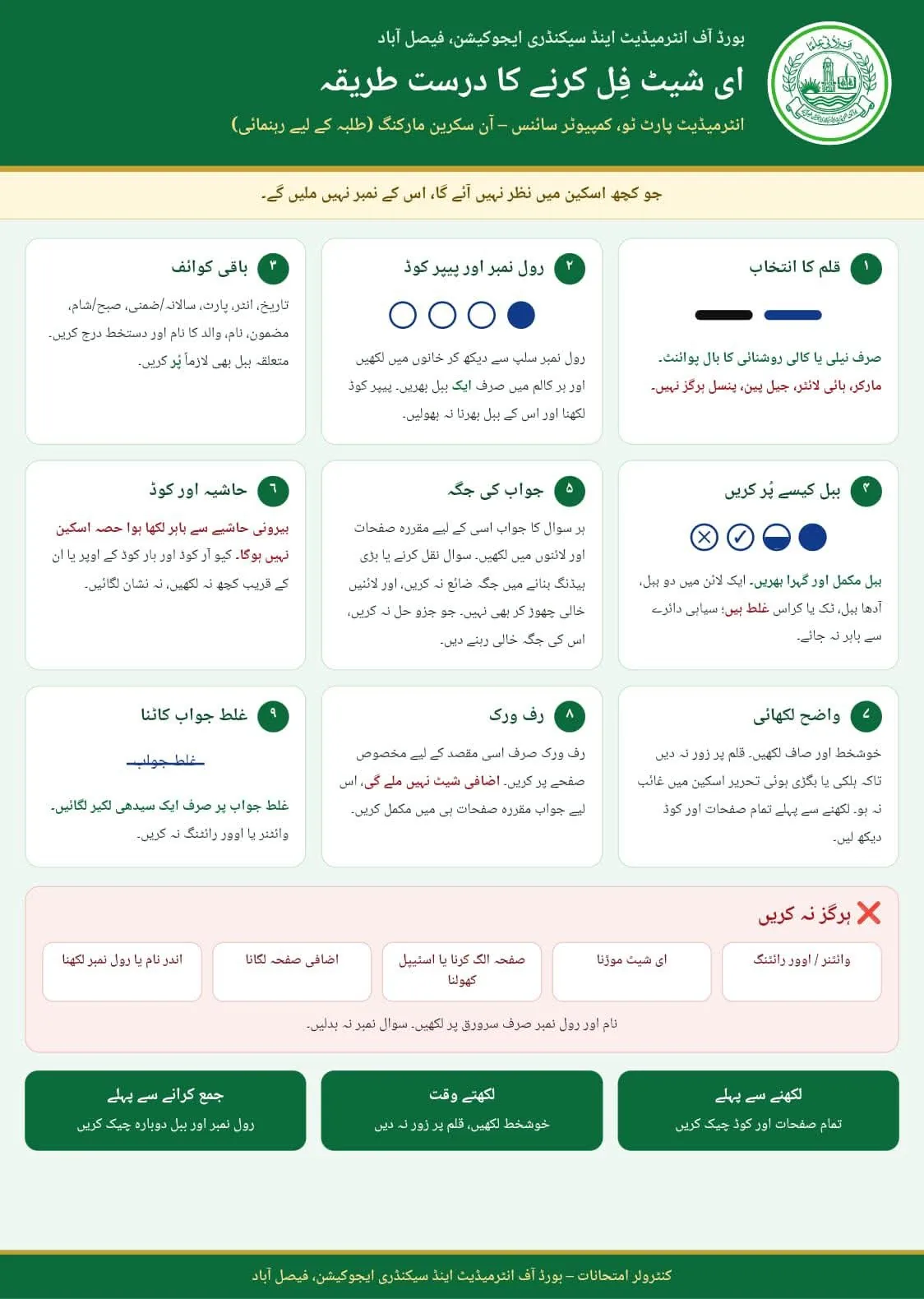
The Right Way to Fill the E-Sheet
Intermediate Part Two, Computer Science – On-Screen Marking
Candidates who have read the rules can test themselves on the practice sheet below, which checks every column and marks each error.
Bubble Sheet Practice
First see the slip, then fill the sheet, then check
1 – Roll number
First write the roll number in the boxes, then fill only one bubble in each column.
2 – Paper code
3 – Remaining particulars
Tap a bubble to fill it completely; tap again to clear it.
Before writing, the board asks candidates to check every page and the code; before submitting, to recheck the roll number and bubbles once more.
The name and roll number belong only on the cover; the question number must never be changed. The sheet must not be folded, its staple must not be opened and no extra page may be attached.
Read More: BISE Faisalabad 11th Result: 61.68pc Candidates Pass
Author Profile

- The Grand Lines covers news that impacts lives, uncovers truths, and keeps you fully informed.
Latest Entries
 EducationNovember 10, 2026Wrong Bubble, No Marks: BISE Faisalabad’s E-Sheet Guide for Candidates
- BusinessNovember 10, 2026Cotton Rate in Pakistan Today: 10 November 2026 — Rs 17,800/Maund
- CrimeNovember 10, 2026Gulberg SHO, five others dismissed over constable narcotics case
- CrimeNovember 10, 2026Man held for beating mother, daughter over crop watering